About Our Event
About Our Event
Welcome to the 26th Annual Guardians Gala. We are so excited to be back in person this year on November 19th at the Richmond Country Club. This event will sell out quickly so be sure to get your tickets on October 7th as seating is limited. As Gatsby says, "A little party never killed anyone." (Great Gatsby Movie 2013)
As many people know, our annual guardians gala is our biggest fundraiser of the year. It is through our fundraising efforts that we are able to provide the day to day items our students need to have the best experience at our school. Most recently our gala proceeds have been contributed to the Maker Space, Outdoor Creative Space, as well as classroom enhancements including sensory lighting, LCD projectors, ChromeBooks, and iPads. This year we are continuing to work towards the purchase and installation of an inclusive and accessible play structure.
As part of our community and supporters there are multiple ways you can help us reach our goal.
1. Purchase an event ticket and join us at our Gala on November 19th
2. Visit Clickbid often to view and bid, bid, bid on our amazing auction lots
Share our Clickbid Auction link far and wide to family and friends
3. Donate an item for our auction.
Do you have your own business that you might be able to donate your services?
Do you have a timeshare or 2nd property that you donate as part of a travel experience package?
Consider getting together with friends to make an interesting themed auction lot.
Do you know a local vendor who may be interested in donating or sponsoring our event?
4. Purchase raffle tickets
5. Make a cash donation. All donations over $20 will be issued a tax receipt
How to Bid on Auction Items
How to Bid on Auction Items
1. Upon logging into Clickbid you will see each available Silent Auction lot and you will be able to preview the Live Auction lots.
2. To search by item type click on "ALL ITEMS" which will create a drop list of categories. Then simply click on the category you wish to view.
3. You also have an option to view a specific item by entering the item number or item name in the search bar.
4. To get more information or to make a bid on an item, you simply click on the item and a box similar to the one below will pop up:
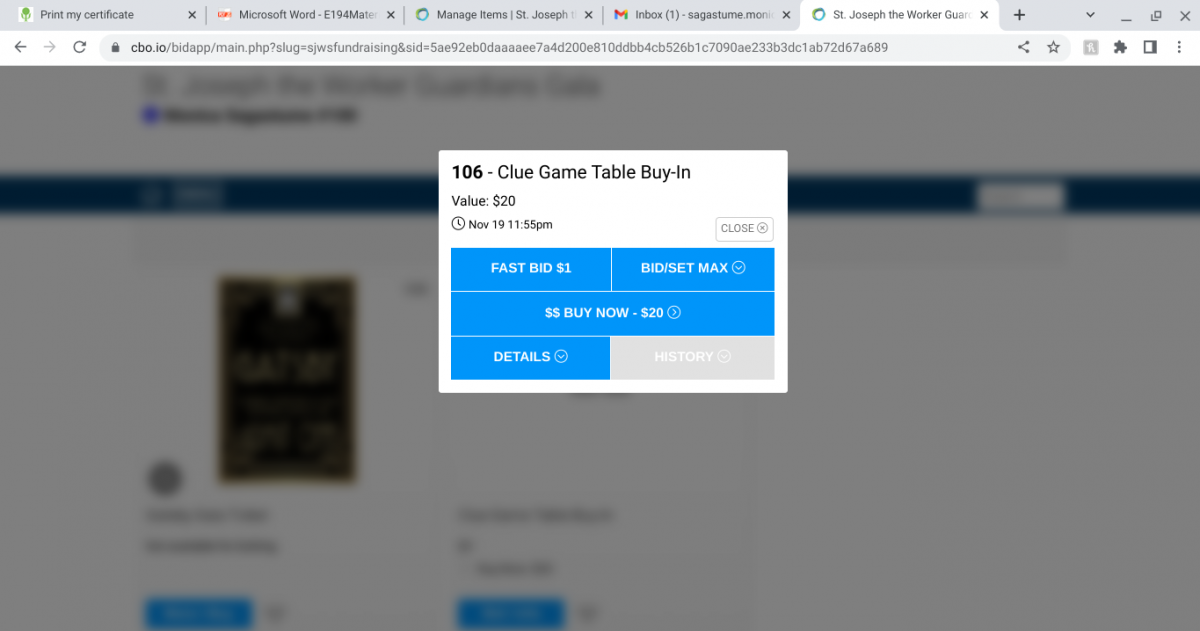
In this pop up box you will be able to find the Lot Number, Name of the Item, Fair Market Value, Bidding Closing Time, Current Bid Options, Bid Increments, Bid History and Lot Details
5. To make a bid you have the option to "FAST BID" which will automatically bid the next amount.
6. You can "BID SET/MAX" which allows you to decide your top bid amount and will automatically outbid others until your highest bid is reached.
6. You will be automatically notified if you have been OUTBID with a link to bid again.
7. At the lot closing time the winner of the lot will be notified.